From NPS score to targeted follow-up in your sports club
The NPS survey shows how likely your members are to recommend the club. Linked to the SCS questionnaire and Power Automate, every response automatically leads to the right follow-up.
Two cases, one story
The NPS case and the SCS case each stand on their own, but together they give a sports club the fullest picture. The NPS survey measures how likely members are to recommend the club and asks whether the club may contact them by email. Power Automate automatically turns those responses into actions: every member who answered Yes receives the SCS questionnaire, promoters are added to a list of potential ambassadors and detractors to a follow-up list.
Why the score alone is not enough
An NPS score tells you how satisfied your members are, but not why. NPS splits the responses into three groups, each raising a different question for the club.
Promoters (9–10)
Are they willing to actively recommend the club?
Passives (7–8)
What is holding them back from being enthusiastic?
Detractors (0–6)
What is going wrong in the way the club works?
Especially for passives and detractors, the club wants to know what could be better. That is why the NPS survey, as described in the NPS case, adds one short question after the rating question: “May we contact you by email?”, answered Yes or No. Members who answer Yes immediately get a follow-up question asking for their email address. That Yes is the consent the rest of the link builds on.
How the link works
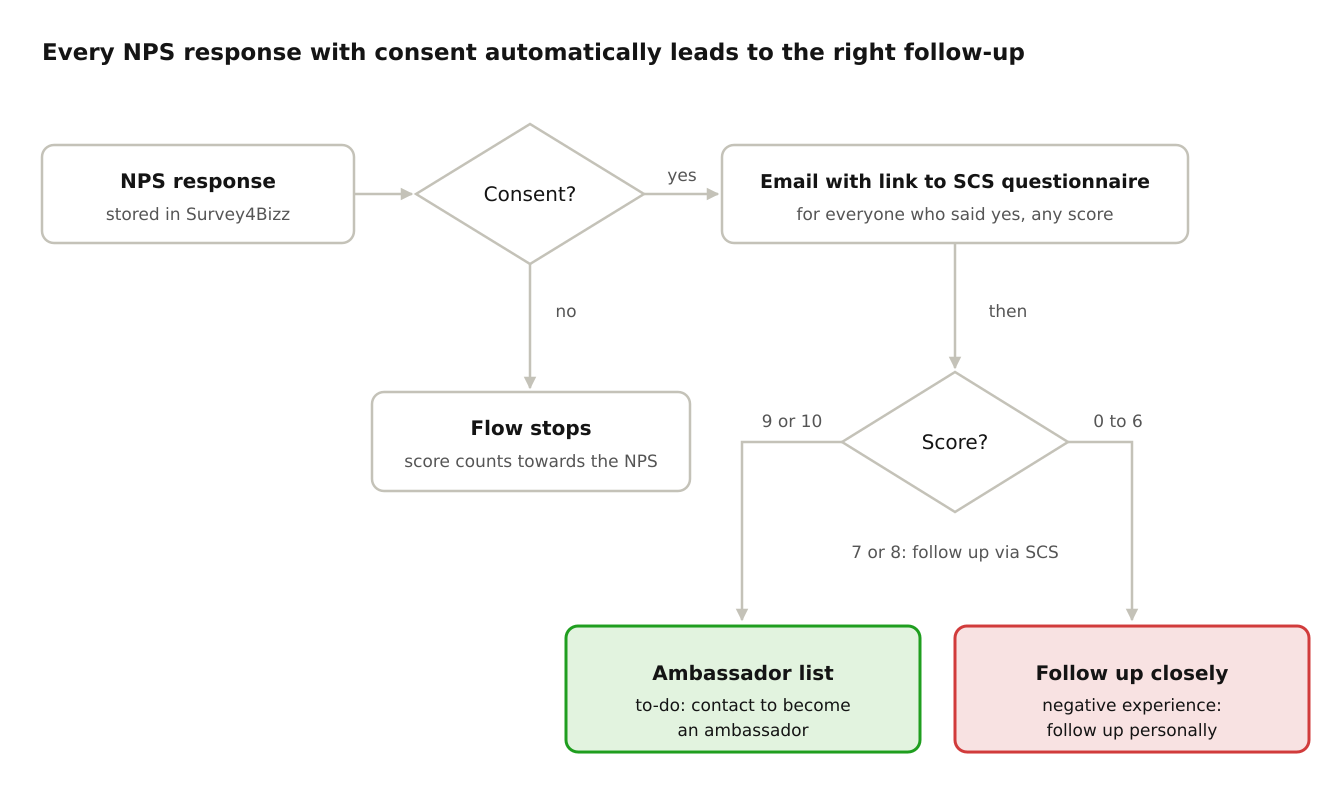
As soon as an NPS response is stored in Survey4Bizz, Power Automate automatically starts a flow through the Survey4Bizz connector.
-
Check consent
The flow checks whether the member answered Yes to “May we contact you by email?”. If the answer is No, the flow stops and the score simply counts towards the NPS.
-
Everyone with consent receives the SCS questionnaire
Every member who answered Yes receives a link to the SCS questionnaire at the email address they entered, whatever their score. This gives you a balanced mix of responses, instead of focusing only on very satisfied or less satisfied members. It is the same SCS questionnaire as in the SCS case.
-
Follow-up based on the score
The flow automatically creates the tasks in Microsoft To Do, or in another task tool the club uses.
- Promoters (9–10): a to-do is added to the list “contact as ambassador”. The club can ask these enthusiastic members to become ambassadors for the club.
- Passives (7–8): they first complete the SCS questionnaire. Based on their answers, the club then follows them up individually.
- Detractors (0–6): the member is added to the list “follow up closely: negative experience”. Members with a bad experience quickly get personal attention.
Every response with consent, the right follow-up
What the club gains
- The score and the story behind it: the NPS gives the overview, the SCS questionnaire explains why members score the way they do.
- No manual work: Power Automate automatically routes the responses to the right lists and emails.
- Finding ambassadors: the club immediately knows which promoters it can ask to help spread the word.
- Responding quickly to negative experiences: detractors are followed up before they drop out.
- Only members who gave consent are contacted: the follow-up respects each member's choice.